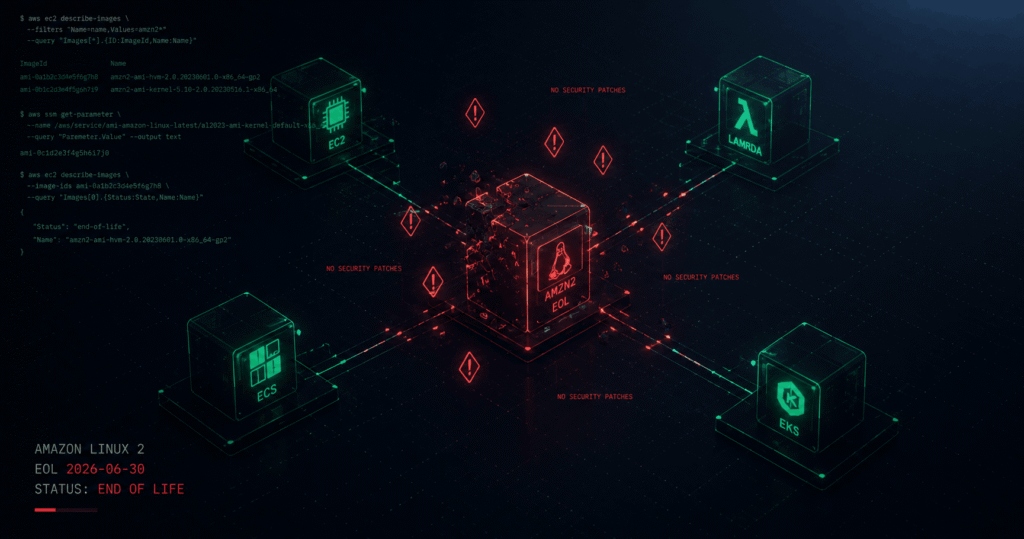
You are running Amazon Linux 2 right now. The EOL date is June 30, 2026, confirmed across every AWS release note published in the last 12 months. It is not a background deprecation that only affects EC2 instances. Amazon Linux 2 is the operating system underneath your Lambda functions, ECS task definitions, EKS node groups, and Elastic Beanstalk environments. After June 30, AWS stops issuing security patches, bug fixes, and OS-level updates for all of it. Every CVE disclosed against AL2 after that date gets a patch for Amazon Linux 2023. It gets nothing for AL2.
⚠️ Amazon Linux 2 end of life: June 30, 2026. AWS has extended this deadline three times since the originally scheduled June 2023 date. There are no further extensions planned.
What Amazon Linux 2 EOL Actually Means Across Your AWS Account
“End of life” does not mean your infrastructure stops working on July 1. EC2 instances keep running. Lambda functions keep executing. ECS tasks keep scheduling. What stops permanently is AWS’s obligation to patch the OS underneath all of it.
The failure mode is the same as every other EOL event, silent and cumulative. Each CVE disclosed post-June 30 that affects the AL2 kernel, system libraries, or core packages accrues permanently with no remediation path from AWS. Your exposure grows every week.
The scope is what makes Amazon Linux 2 EOL operationally significant in a way that Node.js or Python runtimes are not. It is not one runtime on one service. It is the base OS for an entire AWS account’s worth of compute.
| What stops on June 30, 2026 | What continues working |
|---|---|
| Security patches for AL2 core packages | Existing EC2 instances continue running |
| Bug fixes for AL2 kernel | Lambda functions continue executing |
| AWS-provided AL2 AMI updates | ECS tasks continue scheduling |
| AWS Batch AL2 compute environment creation | Traffic continues flowing |
| ECS AL2-optimised AMI releases | None of the above will be patched |
Source: docs.aws.amazon.com/AL2/latest/relnotes, docs.aws.amazon.com/AmazonECS/latest/developerguide
Where Amazon Linux 2 Is Hiding in Your AWS Account
The teams that get caught are not the ones running obvious AL2 EC2 instances — those show up in any inventory audit. The ones that generate incidents are the ones where AL2 is the invisible OS layer underneath managed services they did not consciously choose it for.
EC2 Instances
The most direct exposure. Any instance launched from an amzn2-ami-* AMI is running AL2.
# List all running instances with their AMI IDs and names
aws ec2 describe-instances \
  --filters "Name=instance-state-name,Values=running" \
  --query 'Reservations[].Instances[].[InstanceId,ImageId,Tags[?Key==`Name`].Value|[0],Placement.AvailabilityZone]' \
  --output table

# Check if a specific AMI is AL2 (look for "amzn2" in the name)
aws ec2 describe-images \
  --image-ids ami-YOURAMINID \
  --query 'Images[0].Name'
# Returns: "amzn2-ami-kernel-5.10-hvm-2.0.20260508.0-x86_64-gp2" ← This is AL2

# Find all running instances using AL2 AMIs across a region
aws ec2 describe-instances \
  --filters "Name=instance-state-name,Values=running" \
  --query 'Reservations[].Instances[].[InstanceId,ImageId]' \
  --output text | while read id ami; do
    name=$(aws ec2 describe-images --image-ids "$ami" \
      --query 'Images[0].Name' --output text 2>/dev/null)
    if [[ "$name" == amzn2* ]]; then
      echo "AL2: $id ($ami)"
    fi
  done
Lambda Functions — Multiple Runtimes Affected
This is where the scope expands beyond what most teams expect. Lambda functions using the following runtimes are running on Amazon Linux 2:
| Lambda runtime | Underlying OS | AWS deprecation status |
|---|---|---|
python3.10 | Amazon Linux 2 | Extended patches until runtime EOL |
python3.11 | Amazon Linux 2 | Extended patches until runtime EOL |
java8.al2 | Amazon Linux 2 | Extended patches until runtime EOL |
java11 | Amazon Linux 2 | Extended patches until runtime EOL |
java17 | Amazon Linux 2 | Extended patches until runtime EOL |
provided.al2 | Amazon Linux 2 | EOL July 31, 2026 — 31 days after AL2 |
python3.12+ | Amazon Linux 2023 | ✅ Not affected |
nodejs20.x+ | Amazon Linux 2023 | ✅ Not affected |
Source: docs.aws.amazon.com/lambda/latest/dg/lambda-runtimes.html
AWS has committed to patching the AL2-based Lambda runtimes (Java 8/11/17, Python 3.10/3.11) for critical issues past June 30 until their individual runtime deprecation dates. The provided.al2 OS-only runtime has a hard deprecation date of July 31, 2026 with no extended patching.
# Find all Lambda functions using AL2-based runtimes in a region
aws lambda list-functions \
  --region us-east-1 \
  --query "Functions[?contains(['python3.10','python3.11','java8.al2','java11','java17','provided.al2'], Runtime)].[FunctionName,Runtime,LastModified]" \
  --output table

# Scan all regions
for region in $(aws ec2 describe-regions \
  --query 'Regions[].RegionName' --output text); do
  echo "=== $region ==="
  aws lambda list-functions \
    --region "$region" \
    --query "Functions[?contains(['python3.10','python3.11','java8.al2','java11','java17','provided.al2'], Runtime)].[FunctionName,Runtime]" \
    --output text 2>/dev/null
done
ECS — Task Definitions and Cluster AMIs
The Amazon ECS-Optimised Amazon Linux 2 AMI reaches end-of-life on June 30, 2026, mirroring the same EOL date of the upstream Amazon Linux 2 operating system.
Effective June 30, 2026, AWS Batch will block creation of new Amazon ECS compute environments using Batch-provided Amazon Linux 2 AMIs. After this date, you can only create new Amazon ECS compute environments using Amazon Linux 2023 or customer-provided AMIs.
Your ECS exposure has two layers: the container instance AMI (the EC2 host running the ECS agent) and any container images built using amazonlinux:2 as a base image.
# List ECS container instances and their AMI IDs
aws ecs list-container-instances \
  --cluster your-cluster-name \
  --output text | awk '{print $2}' | while read arn; do
  ec2_id=$(aws ecs describe-container-instances \
    --cluster your-cluster-name \
    --container-instances "$arn" \
    --query 'containerInstances[0].ec2InstanceId' \
    --output text)
  ami=$(aws ec2 describe-instances \
    --instance-ids "$ec2_id" \
    --query 'Reservations[0].Instances[0].ImageId' \
    --output text)
  echo "$ec2_id: $ami"
done

# Find AL2 base images in Dockerfiles
grep -rn "FROM amazonlinux:2" . --include="Dockerfile*"
grep -rn "FROM public.ecr.aws/amazonlinux/amazonlinux:2" . --include="Dockerfile*"
EKS Node Groups
Amazon Linux 2 is supported by AWS until its end-of-support date on June 30, 2026. Additionally, you can build a custom AMI with an Amazon Linux 2 base instance until the Amazon Linux 2 EOS date on June 30, 2026. AWS recommends creating and implementing a migration plan that includes thorough application workload testing and documented rollback procedures.
# Find EKS node groups using AL2 AMI type
aws eks list-nodegroups \
  --cluster-name your-cluster \
  --output text | while read ng; do
  ami_type=$(aws eks describe-nodegroup \
    --cluster-name your-cluster \
    --nodegroup-name "$ng" \
    --query 'nodegroup.amiType' \
    --output text)
  echo "$ng: $ami_type"
done
# Look for: AL2_x86_64, AL2_x86_64_GPU, AL2_ARM_64
# These all need migration to: AL2023_x86_64_STANDARD, AL2023_ARM_64_STANDARD
Container Images Using amazonlinux:2
# Find amazonlinux:2 base images in all Dockerfiles in your repo
grep -rn "amazonlinux:2" . --include="Dockerfile*"
grep -rn "public.ecr.aws/amazonlinux/amazonlinux:2" . --include="Dockerfile*"

# Check running containers
docker ps --format "{{.Image}}" | grep "amazonlinux"

# Inspect a built image to see its base OS
docker inspect your-image:tag | grep -i "amazon"
The Service-by-Service Migration Path
There is no in-place upgrade from AL2 to AL2023. You cannot run yum update and arrive at AL2023. It is a new OS with a new AMI, new packages, and breaking changes that require testing before you put it in front of production traffic. Plan for this.
EC2: Replace Instances – Not In-Place Upgrade
The migration path for EC2 is launch new instances from an AL2023 AMI, validate your application, then terminate the AL2 instances. Never try to upgrade an existing AL2 instance in place to AL2023.
# Get the latest AL2023 AMI for your region
aws ec2 describe-images \
  --owners amazon \
  --filters "Name=name,Values=al2023-ami-*-x86_64" \
             "Name=virtualization-type,Values=hvm" \
             "Name=state,Values=available" \
  --query 'sort_by(Images, &CreationDate)[-1].[ImageId,Name]' \
  --output text

# For Graviton (ARM) instances
aws ec2 describe-images \
  --owners amazon \
  --filters "Name=name,Values=al2023-ami-*-arm64" \
             "Name=virtualization-type,Values=hvm" \
             "Name=state,Values=available" \
  --query 'sort_by(Images, &CreationDate)[-1].[ImageId,Name]' \
  --output text
Terraform — update your AMI data source:
# Before — AL2
data "aws_ami" "al2" {
  most_recent = true
  owners      = ["amazon"]
  filter {
    name   = "name"
    values = ["amzn2-ami-kernel-5.10-hvm-*-x86_64-gp2"]
  }
}

# After — AL2023
data "aws_ami" "al2023" {
  most_recent = true
  owners      = ["amazon"]
  filter {
    name   = "name"
    values = ["al2023-ami-*-x86_64"]
  }
  filter {
    name   = "virtualization-type"
    values = ["hvm"]
  }
}
Lambda: Update Runtime
For provided.al2 functions (OS-only runtime) migrate to provided.al2023 before July 31, 2026. For Python 3.10 and 3.11, migrate to Python 3.12 or 3.13 (AL2023-based). For Java 8/11/17, AWS is releasing AL2023-based runtimes before end of Q2 2026 — check the Lambda runtime documentation for availability before migrating.
# Update a Lambda function runtime from provided.al2 to provided.al2023
aws lambda update-function-configuration \
  --function-name your-function-name \
  --runtime provided.al2023

# Update Python runtime
aws lambda update-function-configuration \
  --function-name your-function-name \
  --runtime python3.12

# Verify the update
aws lambda get-function-configuration \
  --function-name your-function-name \
  --query '[FunctionName, Runtime, LastModified]' \
  --output table
Terraform:
resource "aws_lambda_function" "api" {
  function_name = "api-handler"

  # Before
  # runtime = "python3.10"  # AL2-based

  # After
  runtime = "python3.12"  # AL2023-based

  handler  = "handler.main"
  filename = "lambda.zip"
  role     = aws_iam_role.lambda.arn
}
ECS: Update Cluster AMI and Container Images
For EC2 launch type clusters, drain and replace container instances with AL2023-optimised AMIs. For Fargate, AWS manages the underlying OS — no action required on your part for Fargate tasks.
# Get latest ECS-optimised AL2023 AMI
aws ssm get-parameters \
  --names /aws/service/ecs/optimized-ami/amazon-linux-2023/recommended \
  --query 'Parameters[0].Value' \
  --output text | python3 -c "import sys,json; d=json.load(sys.stdin); print(d['image_id'], d['image_name'])"
Container images — update your Dockerfiles:
# Before — EOL on June 30, 2026
FROM amazonlinux:2

# After — supported through 2028
FROM amazonlinux:2023

# If using ECR Public
# Before
FROM public.ecr.aws/amazonlinux/amazonlinux:2

# After
FROM public.ecr.aws/amazonlinux/amazonlinux:2023
EKS: Update Node Groups to AL2023
# Terraform — EKS node group AMI type update
resource "aws_eks_node_group" "workers" {
  cluster_name    = aws_eks_cluster.main.name
  node_group_name = "workers-al2023"

  # Before
  # ami_type = "AL2_x86_64"

  # After — AL2023
  ami_type = "AL2023_x86_64_STANDARD"

  instance_types = ["m5.large"]

  scaling_config {
    desired_size = 3
    max_size     = 6
    min_size     = 1
  }

  # Rolling update — replace nodes one at a time
  update_config {
    max_unavailable = 1
  }
}
Breaking Changes: What AL2023 Does Differently
Amazon Linux 2023 is not a drop-in replacement. These are the confirmed breaking changes that will affect production workloads if not tested in advance.
| Change | AL2 behaviour | AL2023 behaviour |
|---|---|---|
| Package manager | yum / amazon-linux-extras | dnf (yum works as alias, amazon-linux-extras removed) |
| IMDSv1 | Enabled by default | Disabled by default — IMDSv2 required |
| Cron | Installed by default | Not installed — use systemd timers |
cgroup version | cgroup v1 | cgroup v2 (breaks some Java JVM versions < jdk8u372) |
| SELinux | Disabled | Permissive mode enabled |
| Python default | Python 3.7 | Python 3.9+ |
| OpenSSL version | OpenSSL 1.0.2 / 1.1.1 | OpenSSL 3.x |
| Package repos | RHEL 7 / Amazon Linux 2 repos | Fedora-based AL2023 repos |
Source: docs.aws.amazon.com/linux/al2023/ug/deprecated-al2023.html, docs.aws.amazon.com/elasticbeanstalk
The two changes that will break your workloads most often:
IMDSv1 disabled: Any code using http://169.254.169.254/latest/meta-data/ without a session token will fail silently on AL2023. This includes some older AWS SDK versions, custom scripts that fetch instance metadata, and any Kubernetes tooling that relies on EC2 metadata for node identity. Audit before migrating:
# Find scripts using IMDSv1 (no token header)
grep -rn "169.254.169.254" . --include="*.sh" --include="*.py" --include="*.rb"

# Test IMDSv2 compliance on an existing AL2023 instance
TOKEN=$(curl -s -X PUT "http://169.254.169.254/latest/api/token" \
  -H "X-aws-ec2-metadata-token-ttl-seconds: 21600")
curl -s -H "X-aws-ec2-metadata-token: $TOKEN" \
  http://169.254.169.254/latest/meta-data/instance-id
amazon-linux-extras removed: If any user data script, cloud-init config, or bootstrap script calls amazon-linux-extras install, it will error on AL2023. The replacement is direct dnf install:
# Before — AL2 only
amazon-linux-extras install -y nginx1
amazon-linux-extras install -y python3.8

# After — AL2023
dnf install -y nginx
dnf install -y python3.9
Compliance Implications
SOC 2 Type II, PCI-DSS v4.0, ISO 27001:2022, and FedRAMP all require that systems receive vendor-provided security patches. After June 30, 2026, AL2 systems fail this control by definition — AWS no longer issues patches regardless of your subscription tier.
For teams in regulated environments: the documentation requirement is immediate. You need to show either migration completion, a risk acceptance with a compensating control plan and defined remediation date, or a commercial extended support contract. AWS does not offer its own extended support for Amazon Linux 2. Commercial options include TuxCare’s Endless Lifecycle Support (ELS) as a transitional arrangement while migration is underway.
The Migration Checklist
This is the minimum required before June 30. Complete each item in order — do not skip the testing step.
- [ ] Audit: Run the CLI scans above for EC2, Lambda, ECS, and EKS across all regions and accounts
- [ ] Identify
amazon-linux-extrasusage: Search all user data scripts, bootstrap files, and Dockerfiles - [ ] Identify IMDSv1 usage: Search application code and scripts for unauth metadata endpoint calls
- [ ] Identify cron jobs: List all crontabs on AL2 instances — replace with systemd timers on AL2023
- [ ] Test JVM versions: If running Java workloads, verify JDK version is ≥ jdk8u372 before migrating to cgroup v2
- [ ] Stage migration: Launch AL2023 instances in a staging environment and run full application validation
- [ ] Lambda runtime updates: Update
provided.al2functions before July 31 — the hard deadline for that runtime - [ ] ECS AMI refresh: Replace AL2-optimised container instance AMIs with AL2023-optimised equivalents
- [ ] EKS node group update: Change
ami_typefromAL2_x86_64toAL2023_x86_64_STANDARDwith a rolling update - [ ] Container image rebuild: Update all Dockerfiles using
amazonlinux:2base toamazonlinux:2023 - [ ] Production rollout: Use blue/green or rolling deployment — never replace all AL2 instances simultaneously
- [ ] Verify: Confirm no AL2 AMIs remain in any auto-scaling group launch template or ECS task definition
FAQ
When does Amazon Linux 2 reach end of life?
Amazon Linux 2 reaches end of life on June 30, 2026. This is confirmed in every AWS release note published since 2025 and in the Amazon Linux 2 FAQs on docs.aws.amazon.com. AWS has extended this deadline three times since the original June 2023 date, no further extensions are planned.
What happens to my EC2 instances after Amazon Linux 2 EOL?
Your instances continue running. AWS does not terminate them. What stops is AWS issuing security patches, bug fixes, and OS updates for AL2. Any CVE disclosed after June 30 against AL2 kernel or packages will have no patch from AWS. Your instances become permanently unpatched compute. You are responsible for all security maintenance from that date forward.
Which Lambda runtimes are affected by Amazon Linux 2 EOL?
Python 3.10, Python 3.11, Java 8 (AL2), Java 11, Java 17, and provided.al2 all run on Amazon Linux 2. AWS will continue patching the language runtimes (Python, Java) for critical AL2 issues until their individual deprecation dates. The provided.al2 OS-only runtime has a hard deprecation date of July 31, 2026 with no extended patches.
Can I upgrade an existing AL2 instance to Amazon Linux 2023 in place?
No. There is no supported in-place upgrade path from Amazon Linux 2 to Amazon Linux 2023. They are different operating systems with different package ecosystems and kernel configurations. The migration path is to launch new instances from AL2023 AMIs, validate your workloads, and terminate the AL2 instances.
What are the biggest breaking changes when migrating from AL2 to AL2023?
The two changes that break the most workloads are: (1) IMDSv2 is required by default — code using the unauthenticated IMDSv1 endpoint at http://169.254.169.254/latest/meta-data/ will fail; and (2) amazon-linux-extras is removed — any script that calls amazon-linux-extras install will error. Package management moves to dnf from yum, though yum works as an alias for backwards compatibility.
Is Amazon Linux 2023 a drop-in replacement for Amazon Linux 2?
High-degree compatibility but not drop-in. Most workloads migrate without code changes. The ones that require attention are those using IMDSv1, amazon-linux-extras, cron jobs, older Java JVM versions, or packages that changed names or were removed between AL2 and AL2023. Test in staging first. AWS provides a comparison guide at docs.aws.amazon.com/linux/al2023 that documents all package-level changes.
Sources and Citations
All facts in this article are verified against primary AWS documentation. No speculation about future CVEs, patch availability, or service behaviour has been included.
- Amazon Linux 2 EOL confirmed — release notes: docs.aws.amazon.com/AL2/latest/relnotes
- Amazon Linux EOL dates — endoflife.date: endoflife.date/amazon-linux
- AWS Lambda runtimes and deprecation policy: docs.aws.amazon.com/lambda/latest/dg/lambda-runtimes.html
provided.al2deprecation date July 31, 2026: github.com/brefphp/bref/issues/2064 (official AWS Health notification text)- ECS AL2-optimised AMI EOL June 30, 2026: docs.aws.amazon.com/AmazonECS/latest/developerguide/ecs-ami-versions.html
- AWS Batch ECS AL2 block from June 30, 2026: docs.aws.amazon.com/batch/latest/userguide/ecs-al2-ami-deprecation.html
- EKS AL2 AMI end of support June 30, 2026: docs.aws.amazon.com/eks/latest/userguide/eks-ami-deprecation-faqs.html
- AL2023 deprecated features (IMDSv1, cron, amazon-linux-extras): docs.aws.amazon.com/linux/al2023/ug/deprecated-al2023.html
- Elastic Beanstalk AL2 to AL2023 differences (IMDSv1, Apache config): docs.aws.amazon.com/elasticbeanstalk
Get notified before the next EOL deadline hits your stack. The Deprecation Digest covers upcoming EOL dates, CVE intersections, and migration guides — every Tuesday. Subscribe free →