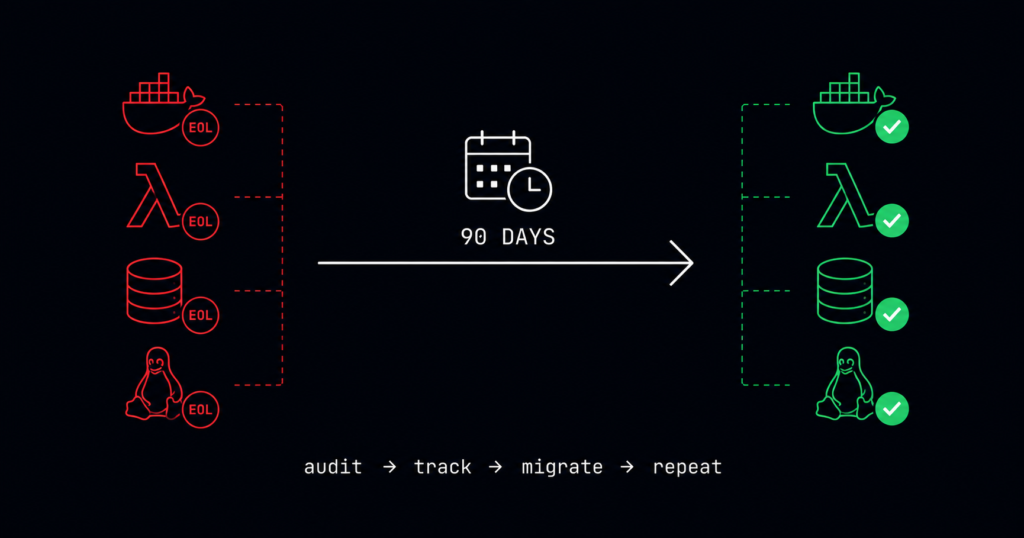
🔴 Most engineering teams discover end of life software devops during a compliance audit – not before. By then, migration becomes an emergency sprint instead of a planned maintenance window. This guide shows you how to stop finding out too late.
Your production stack has an expiry date problem. Somewhere in your infrastructure, a runtime, database, or OS is running past its end-of-life date. You may not know it yet. Most teams do not find out until a SOC 2 auditor flags it, a CVE scanner returns a “will not fix” finding, or a vendor support call gets redirected to a sales pitch for an upgrade.
PCI DSS 4.0 now requires an end-of-life management program as a mandatory control. ISO 27001, HIPAA, and SOC 2 all require organisations to use supported software. Running EOL software is no longer just a technical risk – it is a compliance finding that costs you certifications.
This guide gives you the complete process: how to find EOL software in your stack, how to track it systematically, and how to execute migrations before deadlines become incidents.
What End of Life Actually Means – And What It Does Not
End of life means a vendor has stopped releasing security patches for that version. It does not mean the software stops working. Python 3.9 still runs perfectly on the day it hits EOL. The difference is what happens the day after: any CVE disclosed against Python 3.9 will be marked “will not fix” and your production runtime becomes permanently unpatched.
There is an important distinction between End of Life and End of Support:
| Term | What It Means | What Stops |
| End of Life (EOL) | Full support ends | Security patches, bug fixes, updates |
| End of Support (EOS) | Vendor support ends | Technical support, SLAs |
| Long Term Support (LTS) | Extended security-only period | New features (security patches continue) |
| Extended Security Updates (ESU) | Paid patch extension | Nothing but costs money |
The dangerous phase is LTS. Teams see “LTS” and assume safety. Packages your workloads depend on may not be covered by LTS at all. Ubuntu 20.04 LTS (Focal Fossa) reaches the end of its standard security maintenance on May 31, 2025. After this date, systems running Focal will no longer receive free security updates for packages in the main Ubuntu repository.
Teams have two options:
- Upgrade workloads to Ubuntu 22.04 LTS or Ubuntu 24.04 LTS (recommended), or
- Enroll servers into Ubuntu Pro to receive Expanded Security Maintenance (ESM) coverage until April 2030.
Running Ubuntu 20.04 past May 2025 without either upgrading or enabling Ubuntu Pro means accepting unpatched exposure in your base OS, a common issue that appears during compliance audits and vulnerability scans.
For exact lifecycle dates and support options, refer to the official Ubuntu documentation:
👉 Ubuntu release lifecycle and ESM details
Why DevOps Teams Have a Specific EOL Problem
Traditional IT teams managed a finite set of servers with documented OS versions. DevOps teams manage:
- Docker base images pulled months or years ago – often pinned to
debian:bullseyeornode:16with no automated update - Lambda runtimes set at function creation and forgotten
- Helm chart dependencies that pull in specific runtime versions
- CI/CD pipeline base images that predate the team building on them
- Kubernetes versions that auto-upgrade the control plane but leave node images stale
- Development containers specified in
.devcontainer.jsonrunning versions from two years ago
The core problem is that EOL software in DevOps stacks is often invisible. It does not announce itself. A Dockerfile containing FROM python:3.9-slim does not send you an alert when Python 3.9 hits EOL. Your CVE scanner flags it eventually – but often after the EOL date has passed.
How to Audit Your Stack for EOL Software
Run this audit once. Then build the tooling to run it continuously.
Step 1 – Audit Running Containers
# List all Docker images in use and extract base image versions
docker images --format "{{.Repository}}:{{.Tag}}" | \
  xargs -I {} docker inspect {} 2>/dev/null | \
  jq -r '.[].Config.Labels // empty |
  to_entries[] | select(.key | contains("version")) | .value'

# Check base OS in running containers
for container in $(docker ps -q); do
  echo "=== $(docker inspect $container | jq -r '.[].Name') ==="
  docker exec $container cat /etc/os-release 2>/dev/null | \
    grep -E "^(NAME|VERSION)="
  docker exec $container python3 --version 2>/dev/null || true
  docker exec $container node --version 2>/dev/null || true
done

# Find containers using EOL base images
# grep for known EOL tags
docker images | grep -E \
  "bullseye|buster|node:14|node:16|node:18|python:3.8|python:3.9"
Step 2 – Audit Lambda Runtimes (AWS)
# List all Lambda functions and their runtimes across all regions
for region in $(aws ec2 describe-regions \
  --query 'Regions[].RegionName' --output text); do
  echo "=== Region: $region ==="
  aws lambda list-functions --region $region \
    --query 'Functions[*].[FunctionName,Runtime,LastModified]' \
    --output table 2>/dev/null
done

# Filter for known EOL runtimes
aws lambda list-functions --region us-east-1 \
  --query 'Functions[?Runtime==`nodejs16.x` ||
           Runtime==`nodejs14.x` ||
           Runtime==`python3.8` ||
           Runtime==`python3.9`].
           [FunctionName,Runtime]' \
  --output table
Step 3 – Audit Kubernetes Node Versions
# Check cluster version and node versions
kubectl version --short

# List all nodes and their OS/kernel versions
kubectl get nodes -o wide

# Check which Kubernetes version you are running
# against the support window at kubernetes.io/releases
kubectl version --output=json | jq '.serverVersion.gitVersion'

# Check node images specifically
kubectl get nodes -o json | \
  jq -r '.items[].status.nodeInfo |
  "\(.nodeName // "unknown") | OS: \(.osImage) |
  Kernel: \(.kernelVersion)"' 2>/dev/null || \
kubectl get nodes -o json | \
  jq -r '.items[] |
  "\(.metadata.name) | \(.status.nodeInfo.osImage)"'
Step 4 – Audit Linux OS Versions
# On each server — check OS release
cat /etc/os-release

# Check across multiple servers using SSH
for host in server1 server2 server3; do
  echo "=== $host ==="
  ssh $host "cat /etc/os-release | grep -E '^(NAME|VERSION)='"
done

# If using Ansible — gather OS facts across fleet
ansible all -m setup -a 'filter=ansible_distribution*' \
  | grep -E "(distribution|distribution_version|distribution_release)"
Step 5 – Audit Package Dependencies
# Python projects - check for EOL runtime requirements
cat requirements.txt | grep -i python
cat setup.py | grep -i python_requires
cat pyproject.toml | grep -i python

# Node.js projects — check engines field
cat package.json | jq '.engines'

# Check for pinned EOL base images in Dockerfiles
find . -name "Dockerfile*" -exec \
  grep -H "FROM.*\(node:1[0-8]\|python:3\.[0-9]\|debian:buster\|debian:bullseye\|ubuntu:20\.04\|ubuntu:18\.04\)" {} \;
Building a Systematic EOL Tracking Process
Running the audit once tells you your current state. Building a process keeps you from ending up in the same position again in 12 months.
The EOL Register
Create and maintain a simple spreadsheet or database table with these fields for every tool in your stack:
| Field | Example |
| Tool Name | Python |
| Version in Use | 3.10.x |
| EOL Date | October 31, 2026 |
| Days Remaining | 176 |
| Environments | prod-api, staging, lambda-functions |
| Owner | Platform team |
| Migration Target | Python 3.12.x |
| Migration Deadline | August 31, 2026 |
| Status | In planning |
Update this monthly. Check endoflife.date for every tool in the register. When a tool enters the 90-day window, it becomes a sprint priority – not a backlog item.
Automated EOL Monitoring
Use the endoflife.date API to query EOL dates programmatically and build alerts into your existing monitoring stack:
import requests
from datetime import datetime, date

def check_eol(product: str, version: str) -> dict:
    """
    Query endoflife.date API for EOL status.
    Returns dict with eol date and days remaining.
    """
    url = f"https://endoflife.date/api/{product}/{version}.json"
    response = requests.get(url, timeout=10)

    if response.status_code == 404:
        return {"status": "unknown", "product": product, "version": version}

    data = response.json()
    eol_date = datetime.strptime(str(data.get("eol")), "%Y-%m-%d").date()
    days_remaining = (eol_date - date.today()).days

    return {
        "product": product,
        "version": version,
        "eol_date": str(eol_date),
        "days_remaining": days_remaining,
        "status": "eol" if days_remaining <= 0 else
                  "critical" if days_remaining <= 90 else
                  "warning" if days_remaining <= 180 else "ok"
    }

# Check your stack
stack = [
    ("python", "3.10"),
    ("nodejs", "20"),
    ("debian", "11"),
    ("postgresql", "14"),
]

for product, version in stack:
    result = check_eol(product, version)
    if result["status"] in ("eol", "critical"):
        print(f"🔴 {result['product']} {result['version']}: "
              f"{result['days_remaining']} days — ACTION REQUIRED")
    elif result["status"] == "warning":
        print(f"🟡 {result['product']} {result['version']}: "
              f"{result['days_remaining']} days — plan migration")
Run this script as a weekly cron job and pipe the output to your Slack security channel.
The Compliance Dimension – Why This Is Now Mandatory
Running EOL software is no longer just an engineering decision. Every major compliance framework now explicitly addresses it.
PCI DSS 4.0 control 12.3.4, which took effect March 31, 2025, requires a formal end-of-life management program. Auditors now ask for your EOL register as standard evidence.
ISO 27001 Annex A 8.8 (Vulnerability Management) requires tracking and addressing vulnerabilities including those in unsupported software. An EOL tool with unpatched CVEs is a direct finding under this control.
SOC 2 Type II auditors flag EOL software under the Availability and Risk Assessment criteria. If your SOC 2 scope includes production infrastructure running EOL runtimes, expect a finding.
The practical implication: your EOL register is now audit evidence, not just an internal tool. It demonstrates a control exists and is operating. Teams that show up to audits with a maintained EOL register and documented migration plans pass. Teams that show up without one fail.
Executing the Migration – A Framework
When a tool enters your 90-day critical window, follow this framework:
| Timeline | Action |
| 90 days out | Confirm migration target version, assess breaking changes |
| 75 days out | Begin migration in development environment |
| 60 days out | Complete dev migration, begin staging migration |
| 45 days out | Complete staging migration, begin production pilot |
| 30 days out | Begin rolling production migration |
| 14 days out | Complete production migration, verify monitoring |
| EOL date | Decommission old version, update EOL register |
This framework treats an EOL migration as a planned project, not an emergency. The teams that scramble are the ones who started at 14 days instead of 90.
Start With the Audit
Run the audit commands in this guide against your production infrastructure today and not next sprint. In about 20 minutes, you can identify exactly which runtimes, operating systems, and data platforms in your stack are past or approaching end of support.
That list becomes your EOL register.
The register becomes your compliance evidence.
And that evidence is what separates a clean audit from an emergency migration sprint.
To speed this up, use the live EOL reference table here:
👉 EOL Calendar — real-time end-of-support dates
It shows current end-of-support timelines for the most common production stacks sourced from endoflife.date. Use the filter to find your technologies, verify the dates via each Details link, and map the results directly into your EOL register before making production changes.
The audit commands are already in this guide.
The lifecycle data is one click away.
The only thing missing is the 20 minutes to run it.