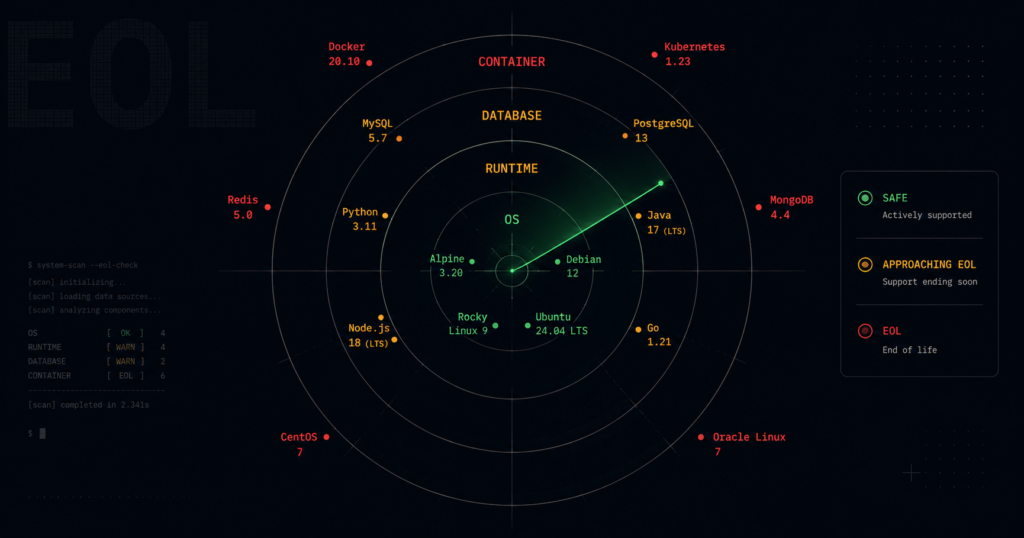
QUOTE BLOCK: 🔴 Audit Warning: Core infrastructure tools including Python 3.9, Node.js 18, and Ubuntu 20.04 reach their end-of-life dates in 2025, triggering automatic compliance failures and critical security risks if not migrated.
Most engineering teams discover end-of-life software during a SOC 2 audit, scrambling to migrate critical production systems with zero testing time. When a runtime or operating system hits its EOL date, it stops receiving security patches forever – even for critical vulnerabilities discovered the very next day. You have until these hard deadlines to find and migrate the decaying dependencies hidden deep inside your Docker base images, CI/CD pipelines, and Kubernetes clusters.
What End of Life Actually Means for Production Systems
There is a massive operational difference between “End of Active Support” and “End of Life.” Active Support means the vendor is still adding features and fixing non-critical bugs. Security Support (often called LTS or Maintenance mode) means feature development has stopped, but critical security vulnerabilities still receive patches. End of Life means the vendor has abandoned the release entirely.
If a 9.8 critical remote code execution vulnerability is discovered the day after an EOL date, no patch will ever be released. Attackers understand this lifecycle. They routinely monitor security patches released for modern, supported versions, then reverse-engineer those patches to build exploits for older, unpatched EOL versions. Because the EOL software shares legacy code paths with the modern software, the exploits almost always work.
Running EOL software also breaks compliance. SOC 2 (specifically control CC7.1) and ISO 27001 mandate active vulnerability management. Auditors do not ask for your opinion; they run automated scanners. Finding an unpatched, unsupported operating system or runtime in your production environment results in an immediate audit exception, which can halt enterprise sales. You cannot argue compensating controls for software that the original authors have explicitly told you is unsafe.
Critical Deadlines Your Team Must Track
You must audit your stack against these specific deadlines. Moving to the recommended Long Term Support (LTS) version guarantees you the longest possible window before you have to perform this migration again.
| Tool | Status | EOL Date | Recommended LTS Target |
| Jenkins 2.346.x | 🔴 EOL | June 2023 | Jenkins 2.440.x LTS |
| Node.js 18.x | ⚠️ Approaching EOL | April 30, 2025 | Node.js 22 LTS |
| Ubuntu 20.04 | ⚠️ Approaching EOL | May 2025 | Ubuntu 24.04 LTS |
| Python 3.9.x | ⚠️ Approaching EOL | October 5, 2025 | Python 3.12.x |
Note that tools like Jenkins 2.346 are already dead. Critical vulnerabilities like CVE-2023-43494 currently exist in the wild for this version and will never be remediated. If you are running it, you are already compromised.
How to Find Hidden EOL Software in Your Stack
You cannot migrate what you do not know you are running. Most EOL software does not live on developer laptops; it hides in base container images that have not been rebuilt in months, or in build agents configured years ago.
Here is how to definitively find these versions across your environments.
# Find EOL Python versions running inside your local Docker images
docker images --format "{{.Repository}}:{{.Tag}}" | grep -v "<none>" | \
  xargs -I {} docker run --rm --entrypoint python {} --version 2>&1 | \
  grep -E "3\.8|3\.9"

# Find EOL Node.js running in your Kubernetes pods
kubectl get pods --all-namespaces -o json | \
  jq -r '.items[].spec.containers[].image' | sort -u | grep node:18

# Audit Ubuntu versions across all AWS EC2 instances
aws ssm describe-instance-information \
  --query "InstanceInformationList[*].[InstanceId,PlatformName,PlatformVersion]" \
  --output table | grep -i "20.04"
Building an Automated EOL Detection System
Manual audits do not scale. You must integrate EOL tracking directly into your CI/CD pipelines to block developers from introducing soon-to-be-dead dependencies. The best source of truth for this data is the open-source API provided by endoflife.date, combined with data from the National Vulnerability Database (NVD).
You can query the API directly in your build scripts to fail a build if an EOL runtime is detected:
# Check if the current Node.js version is beyond its EOL date
NODE_VERSION="18"
EOL_DATE=$(curl -s https://endoflife.date/api/nodejs/${NODE_VERSION}.json | jq -r '.eol')
CURRENT_DATE=$(date +%Y-%m-%d)

if [[ "$CURRENT_DATE" > "$EOL_DATE" ]]; then
  echo "CRITICAL: Node.js ${NODE_VERSION} reached EOL on ${EOL_DATE}."
  echo "Build failed. Migrate to Node.js 22 LTS."
  exit 1
fi
The Migration Path: Transitioning to LTS Versions
Your goal is always to target the newest LTS release, not just the “next” version. Upgrading from Python 3.9 to Python 3.10 only buys you one additional year before you have to do this again. Moving directly to Python 3.12 secures your stack until late 2028.
Standard Docker-Based Deployments
The most common migration path is updating your Dockerfile base images. Do not use the latest tag, as this makes future auditing impossible and leads to unpredictable builds. Pin to the specific LTS version.
Dockerfile
# Before: Running an OS and runtime approaching EOL
FROM node:18-bullseye-slim

# After: Pinned to supported LTS OS and runtime
FROM node:22-bookworm-slim
CI/CD Infrastructure Updates
Your GitHub Actions or GitLab CI runners dictate the runtime environment for your tests. Update your workflow files to matrix test against the new LTS targets immediately, ensuring your codebase supports the new runtimes before you deploy them to production.
YAML
# GitHub Actions Node.js matrix update
jobs:
  test:
    runs-on: ubuntu-24.04
    strategy:
      matrix:
        # Drop 18, add 22 LTS as the primary target
        node-version: [20.x, 22.x]
    steps:
    - uses: actions/checkout@v4
    - name: Use Node.js ${{ matrix.node-version }}
      uses: actions/setup-node@v4
      with:
        node-version: ${{ matrix.node-version }}
Breaking Changes to Watch For
Jumping across multiple major versions to reach a new LTS target will introduce breaking changes. You must allocate engineering time to address these before the EOL deadline forces your hand.
- Node.js 18 to 22: The native
fetchAPI is now stable and enabled by default, which may conflict with legacy third-party HTTP libraries you previously installed. V8 engine updates will change memory footprint behaviors in heavily loaded production services. - Python 3.9 to 3.12: Python 3.12 completely removes several deprecated standard library modules (like
distutils). You will need to switch tosetuptools. Thetypingmodule has also seen significant architectural changes that will break older static analysis tools. - Ubuntu 20.04 to 24.04: This OS migration upgrades OpenSSL from 1.1.1 to 3.0. OpenSSL 3.0 disables legacy cryptographic algorithms by default. If your applications communicate with legacy third-party APIs using outdated TLS ciphers, the connection will fail at the OS level.
Timeline and Recommended Action
Do not wait for a security incident or an auditor’s report to begin this process. Use this framework to manage the migrations ahead of the 2025 deadlines.
| Timeframe | Action |
| This week | Run the detection commands above across your production hosts and CI/CD pipelines to quantify your exact exposure. |
| Within 30 days | Update your testing matrix to include the target LTS versions (Node 22, Python 3.12, Ubuntu 24.04). |
| Within 60 days | Migrate development, staging, and internal tooling environments to the new LTS targets to catch breaking changes. |
| Before EOL date | Deploy all production services on the supported LTS versions and implement pipeline breakers to prevent regressions. |
Start by auditing your container base images today, finding your exposure is the first step to fixing it before the deadline becomes a permanent finding.